

LK Magazine Premium Blogger Template Free Download
This template is New Magazine Style blogger template created by me.This is very flexible multi functional premium blogger template.This is the first template in this LK Magazine style Series designed by me with very good premium features.


3 Column Footer with Rounded corner Headers


Template Info
Name: LK Magazine
Author:Keerthi Bandara
Designer:Lasantha Bandara
Best viewing Browser: Internet Explorer 8, Firefox 3.5, Opera 10,Google Chrome
Demo | Download
Template Features
This template is very SEO Friendly Blogger Template.And also Adsense Ready Template.Fast Page Loading time.
Column: 4 Columns
2 Navigation Bar
1 image slider
1 Multi tab view widget
1 Featured Video section
4 Ads Space
1 CSS Search Box
2 column header
468*60 Header banner
468*60 Header logo
3 Sidebar Gadget section
3 Footer Gadget section
3 Column footer section with rounded corner headers
Auto Read more feature with thumbnails
Related Post feature with jquery
Social Bookmarking Widget installed
Breadcrumbs Navigation hack installed
SEO friendly blogger title hack installed
Meta tags installed
Top Bar with Subscribe buttons and Display Day,Month,Year
To make this template fully worked, Please follow steps below:
1. Sign into your Blogger's dashboard, choose the blog's "layout" .
2. Under "Layout" tab, choose the "Edit HTML" option.
3. You might need to backup the template before you upload it, click "download full template template" to save the template file into the computer.
4. You can see the word "Upload a template from a file on your hard drive.", choose the "(template name).xml" and upload it.
5. Find an image hosting site such as Photobucket to upload images contained in "Images_please upload first!" folder.
6. Go to "Edit HTML" again, find the "IMAGE-LINK-HERE/(image name).jpg" and "IMAGE-LINK-HERE/(image name).png" and change with the URL of your hosted image.
7. You don't need to host jquery.min.js,because it is hosted by google for you.But if you need to host it yourself you can do so.
8.And also Follow the instruction below.
Template Customization
Configure Meta tags
Login to your blogger dashboard--> layout- -> Edit HTML.Now Scroll down to where you see below codes :
<meta content='DESCRIPTION HERE' name='description'/>
<meta content='KEYWORDS HERE' name='keywords'/>
<meta content='AUTHOR NAME HERE' name='author'/>
<meta content='never' name='Expires'/>
<meta content='INDEX,FOLLOW' name='Robots'/>
<meta content='4 Days' name='Revisit-after'/>
Replace DESCRIPTION HERE,KEYWORDS HERE,AUTHOR NAME HERE as below.
DESCRIPTION HERE:Write your blog description
KEYWORDS HERE:Write the keywords of your blog separated by comma.
AUTHOR NAME HERE:Write the author's name(Your name)
Configure First and Second Navigation Bar
Login to your blogger dashboard--> layout- -> Edit HTML.Now Scroll down to where you see below code :
<li><a href='Your-Link-Here' title='Link-Title'>Link-Name-X</a>Now Replace Your-Link-Here,Link-Title,Link-Name-X with your details.
Configure Header logo
Login to your blogger dashboard--> layout- -> Edit HTML.Now Scroll down to where you see below code :
https://blogger.googleusercontent.com/img/b/R29vZ2xl/AVvXsEhiquk_sPAnaiTf-FspHHgmrZ-ef7reljHWqnEqDh4w1tUncIjr5vg_ZEOjRWDNKKPyHDEyep31TpQQt4FJHrYCutq3sz72KneIIv60Itz9bBL0795eu2e1K9K4p5hmI9rxVCrSGzjK-0c1/+Magazine.png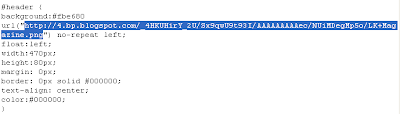
Now replace it with your logo address/url.
Configure image slider
Go to Layout-->Page Elements and click on "Add a gadget".
Select "html/java script" and add the code given below and click save.
<div id="myslides">

<script type="text/javascript">
stepcarousel.setup({
galleryid: 'mygallery', //id of carousel DIV
beltclass: 'belt', //class of inner "belt" DIV containing all the panel DIVs
panelclass: 'panel', //class of panel DIVs each holding content
panelbehavior: {speed:500, wraparound:true, persist:true},
defaultbuttons: {enable: true, moveby: 2, leftnav: ['https://blogger.googleusercontent.com/img/b/R29vZ2xl/AVvXsEiBo7UE0ehhqRjxFwWWvF1FQsvBlX0eT7khxciBnqr-0owJ8hXezfjhV82nUuFYHPMUdc2-St6n6YWAiO2fc2rfwBl6TqJgG5Jr-nqqPmaEnju_iBzO_acpJcCsmNkywveYmzXAJzg0bjWr/', -14, 60], rightnav: ['https://blogger.googleusercontent.com/img/b/R29vZ2xl/AVvXsEjuBSUofHVYkP0O-wxWKH4CKU1KD_cYvB7Wku9rH1nFzZe_lLn8_R9uBD5JXt620KT-lbLgzl17UEoZTiWP5DaXIHj9CxPkwSXjHIK4aviOup5aNt8CCjyLwVKtHXkmaT6QjJFNMkMXhTWk/', 0, 60]},
statusvars: ['statusA', 'statusB', 'statusC'], //register 3 variables that contain current panel (start), current panel (last), and total panels
contenttype: ['external'] //content setting ['inline'] or ['external', 'path_to_external_file']
})
</script>


<div id="mygallery" class="stepcarousel">
<div class="belt">

<div class="panel">
<a href="#" title="NFS Most Wanted">
<img alt="NFS Most Wanted" width="200" src="https://blogger.googleusercontent.com/img/b/R29vZ2xl/AVvXsEhzi2Jb4HgevJWzB92IFp0kx65e9RF8C4KMKma9E9hE2j4WgAzXrUmXk_JjfpHGXEKKQH6Hz_FVD5WH9PmSsCupzfzICuGtJ7qpkggvClcoDhiEKGxBM4t5JUG0JLdemcoN0Vyd7xhxK0t8/+Most+Wanted.jpg" height="120"/>
</a>
</div>

<div class="panel">
<a href="#" title="Call Of Duty">
<img alt="Call Of Duty" width="200" src="https://blogger.googleusercontent.com/img/b/R29vZ2xl/AVvXsEhJ7H6YzIeeEh8TG9yNrI2aTu22nJcgz71es9G_uSR7NSbM2fSLzptyUjF7EWuBw85GoBtThTxLi5GvZD34YjBsEX7Zb9Vg0DcNt7yQ0a69WCWHQJGaTgwog0DeuuiPRfpw93CEEXvfmbyH/+Of+Duty.jpg" height="120"/>
</a>
</div>

<div class="panel">
<a href="#" title="MaxPayne3 Game">
<img alt="MaxPayne3 Game" width="200" src="https://blogger.googleusercontent.com/img/b/R29vZ2xl/AVvXsEgmOsPhwQnLaxqWYacH1o5-ySbXEVULx1_3BOVpkVzd5fJrtY6UQyTy6UGHlQQDNf51amkt7DwS5FrcwSKEoBGrlwOUsaKtwC8CrtKD3IMjxJ4kDkuPAEiQwHCe3OSOA4gmqnKV66323vtG/+game.gif" height="120"/>
</a>
</div>

<div class="panel">
<a href="#" title="Tomb Raider">
<img alt="Tomb Raider" width="200" src="https://blogger.googleusercontent.com/img/b/R29vZ2xl/AVvXsEgAZWLLpRdNFk7RNMbZYtlmjs3bB0hRrBY-FN2__tsdKOYWpO-0fXHlDWSksBnmlC1fYXJ6lggBB23NJlBpNbKyyEAAVlkyHCzV64ndKlxQVHObEivV5Vn8_0plCFHCMRKtN7xYAofi3dob/+Rider.jpg" height="120"/>
</a>
</div>

<div class="panel">
<a href="#" title="Harry Potter">
<img alt="Harry Potter" width="200" src="https://blogger.googleusercontent.com/img/b/R29vZ2xl/AVvXsEi9rhDF9BBdc5qlu1XEqPi3XN2kN4wuvs6MZoFw2FUSV5_wKyvzoTzg0u7Npa_34kEw6KRdl5xuJNW7lh6Mjrsdo96zt3K7v8J7Xucw82pnmjPCRsQcX48jkPVf11oXj_Aab6fKJyWSParr/+potter.jpg" height="120"/>
</a>
</div>

<div class="panel">
<a href="#" title="NFS ProStreet">
<img alt="NFS ProStreet" width="200" src="https://blogger.googleusercontent.com/img/b/R29vZ2xl/AVvXsEiI-RswWBOB78kR6-H8L-9Ot-0jB0mjgQZDVPhFpkNJIEp7I1c38vzTKjMjLBa7bwf1dmo43tRoObmajuYc-MAD58pN30AOJ9YxNL7IvH6aVO-Ht3LFksgtDWNd7Uin3Auc4U5q6qZesq2r/+ProStreet.jpg" height="120"/>
</a>
</div>

<div class="panel">
<a href="#" title="MaxPayne Movie">
<img alt="MaxPayne Movie" width="200" src="https://blogger.googleusercontent.com/img/b/R29vZ2xl/AVvXsEiobs6PxLajtul2Uoc5Gdejdc6cly72p8idj54HO65tJ3Gh_XvFb8rr_bp77bmV1JO5EtGhgORF1ec_naiqpZXUvxjapit0k2aFm9lnsc7mvxY261vWnF4OQuLbo8ZrSMKq54iak_wzNdMu/+movie.jpg" height="120"/>
</a>
</div>

<div class="panel">
<a href="#" title="NFS Undercover">
<img alt="NFS Undercover" width="200" src="https://blogger.googleusercontent.com/img/b/R29vZ2xl/AVvXsEj7kv3b86Mv9zjueDnK-jY6W39Jk7cT61olrN-uESL2HDwWxgGtShiugSHeL0qWnCsjMA_paqiya61uRQy94uI9GtFieMhUYbIzzV7o9gIcut_yOd8tFO9l7C6Px_uYI3NEriA_4id_r9P8/+Undercover.jpg" height="120"/>
</a>
</div>

</div>
</div>
</div>
More details: http://bloggertipandtrick.blogspot.com/2009/11/how-to-add-jquery-images-slider-blogger.html
Configure Multi tab widget
You can add your widget to multitab widget easily.Click on tab name and now click on "Add a Gadget".Now add your widget.But you want to change Tab Names,... read here:
Read here: http://bloggertipandtrick.blogspot.com/2009/11/excellent-jquery-multitab-view-widget.html
Configure Search Box
Find below code :
<div id='search'>
<form action='http://YOURBLOG.blogspot.com/search' id='searchform' method='get' style='display:inline;'>
<input id='s' name='q' type='text' value=''/>
<input id='searchsubmit' type='submit' value=''/>
</form>
</div>
Now Replace http://YOURBLOG.blogspot.com with your blog url.
Configure 125*125 Ad Banners
Find below code in your template.
<!-- Banner -->
<div class='banner'>
<ul>
<li><a href='http://themeforest.net/' rel='bookmark' title=''><img alt='' src='https://blogger.googleusercontent.com/img/b/R29vZ2xl/AVvXsEiDAiVQLfE-i_yyBEwnC__Q05NtozCSjT9PK3M4l1-Gc6dVT9eJ9cHHVKuJe9WblOhyIqdJxkrpoqRDm3JtXzdVKgXghVWNr2eJEns2uP9QJKaNf25NSiRF8q-hNpeGMCove9znvHmtgOdE/+of+TF_125x125.jpg'/></a></li>
<li><a href='http://themeforest.net/' rel='bookmark' title=''><img alt='' src='https://blogger.googleusercontent.com/img/b/R29vZ2xl/AVvXsEiDAiVQLfE-i_yyBEwnC__Q05NtozCSjT9PK3M4l1-Gc6dVT9eJ9cHHVKuJe9WblOhyIqdJxkrpoqRDm3JtXzdVKgXghVWNr2eJEns2uP9QJKaNf25NSiRF8q-hNpeGMCove9znvHmtgOdE/+of+TF_125x125.jpg'/></a></li>
<li><a href='http://themeforest.net/' rel='bookmark' title=''><img alt='' src='https://blogger.googleusercontent.com/img/b/R29vZ2xl/AVvXsEiDAiVQLfE-i_yyBEwnC__Q05NtozCSjT9PK3M4l1-Gc6dVT9eJ9cHHVKuJe9WblOhyIqdJxkrpoqRDm3JtXzdVKgXghVWNr2eJEns2uP9QJKaNf25NSiRF8q-hNpeGMCove9znvHmtgOdE/+of+TF_125x125.jpg'/></a></li>
<li><a href='http://themeforest.net/' rel='bookmark' title=''><img alt='' src='https://blogger.googleusercontent.com/img/b/R29vZ2xl/AVvXsEiDAiVQLfE-i_yyBEwnC__Q05NtozCSjT9PK3M4l1-Gc6dVT9eJ9cHHVKuJe9WblOhyIqdJxkrpoqRDm3JtXzdVKgXghVWNr2eJEns2uP9QJKaNf25NSiRF8q-hNpeGMCove9znvHmtgOdE/+of+TF_125x125.jpg'/></a></li>
</ul>
</div>
<!-- /Banner -->
Now replace http://themeforest.net/ and https://blogger.googleusercontent.com/img/b/R29vZ2xl/AVvXsEiDAiVQLfE-i_yyBEwnC__Q05NtozCSjT9PK3M4l1-Gc6dVT9eJ9cHHVKuJe9WblOhyIqdJxkrpoqRDm3JtXzdVKgXghVWNr2eJEns2uP9QJKaNf25NSiRF8q-hNpeGMCove9znvHmtgOdE/+of+TF_125x125.jpg with your details.
Configure "Blog Posts" Widget
Login to your blogger dashboard--> layout- -> Page elements.Click on "Edit" form "Blog Posts" Section.Now change it value as the picture below:

Now click on "Save".
Important !!!:
Do not remove Footer Credits.
This is free to download and use.But not allowed to sell.
![facebook blogger template]](http://www.bloggertemplatesblog.com/wp-content/uploads/2009/07/facebook-blogger-template-555x320.jpg)


