

Affichage des articles dont le libellé est music player for blogger. Afficher tous les articles
Affichage des articles dont le libellé est music player for blogger. Afficher tous les articles


How to instal music players on blog
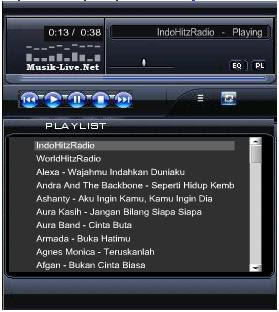
Music Player By posting your blog, then your blog will feel alive, youcan simply listen to your favorite songs, not just your , visitors were also able to enjoying.Widget is very useful for blog-related music.
This time we will use a widget from the music-live.net [screenshot itlike this]
1.Buka your browser and typing http://www.musik-live.net/
2.Lalu click Mp3 Player Skin
3.Pilih Skin / look you want, click Preview to see how it looks skins
4.Copy code
5.Masuk to Blogger with your ID
6.Klik Layout menu -> Page Elements
7.Klik add widget templates
8.Pilih HTML / Javascript
9.Pastekan in town HTML / Javascript
10.Save, finished
Note: Oh yes in a way that appears above song is a song that has been provided, if you want to choose their own songs that you want to display the following way:
1. On the front page of Music-Live, find your favorite song with the search box.
2. Then click the Play & Embed code to display the code
3. Copy the code and paste it into the menu HTML / Javascriptblogger.
4. Completed
Note: This only able to play 1 song only. If you want to play moresongs then use eSnips.
This time we will use a widget from the music-live.net [screenshot itlike this]
1.Buka your browser and typing http://www.musik-live.net/
2.Lalu click Mp3 Player Skin
3.Pilih Skin / look you want, click Preview to see how it looks skins
4.Copy code
5.Masuk to Blogger with your ID
6.Klik Layout menu -> Page Elements
7.Klik add widget templates
8.Pilih HTML / Javascript
9.Pastekan in town HTML / Javascript
10.Save, finished
Note: Oh yes in a way that appears above song is a song that has been provided, if you want to choose their own songs that you want to display the following way:
1. On the front page of Music-Live, find your favorite song with the search box.
2. Then click the Play & Embed code to display the code
3. Copy the code and paste it into the menu HTML / Javascriptblogger.
4. Completed
Note: This only able to play 1 song only. If you want to play moresongs then use eSnips.


